WeatherGuide: Forecast & Radar
MacroSmart TechWeather
4.77.00 Reviews
- Version
- 1.1.2
- Installs
- 10.00K
- Age Rating
- Everyone
Screenshots
Our Review of WeatherGuide: Forecast & Radar
 Analysis by Appyee
I tend to judge weather apps by what happens when I am already late, standing near the door, and trying to decide whether a light jacket is enough. WeatherGuide: Forecast & Radar takes that everyday decision as its starting point. It is a free weather app from MacroSmart Tech, with radar and AI presented as part of the experience rather than as decorative extras. After using it, I see the appeal: it tries to turn a forecast into a simple action, while still giving enough visual information for people who want to check what is moving toward them.
The app is currently on version 1.1.2 and is suitable for Everyone. Its average rating is 4.7 from around four hundred ratings, and it has passed ten thousand installs. Those figures suggest a promising early reception, although I would still treat it as a relatively young product rather than a fully mature replacement for every established weather service. It was released on June 17, 2026, and that timing matters because some of the rough edges feel like the kind of friction that can be improved as the app develops.
Getting past the first points of friction
The most common difficulty with a weather app is not usually reading the forecast. It is getting to a trustworthy forecast quickly. Location selection, a blank first screen, an unfamiliar radar view, or an answer that feels too general can make a useful tool seem unreliable. WeatherGuide is designed around a direct “what should I wear or carry?” question, but that does not remove the need to check the basics before judging its advice.
My first recommendation is to begin with a known place rather than immediately relying on automatic location. If the app opens with an empty or incomplete result, manually choosing your town or the place you are travelling to is a sensible recovery step. This also creates a better test: you can compare the same location in the app and in your usual weather source without wondering whether the phone selected the wrong nearby area.
That distinction is especially useful in cities with changing conditions across districts, or in rural areas where a forecast point may be several kilometres away. A weather app can be functioning normally while its selected location is simply not the one you had in mind. I would check the displayed place before blaming the forecast itself.
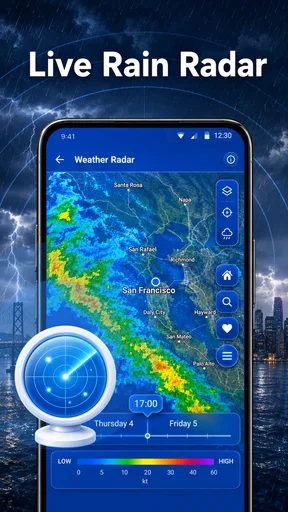
The radar view can also cause hesitation at first. Radar is more useful when I read it as a short-term movement tool, not as a promise about the entire day. If a rain band is approaching, the animation can help me decide whether to leave now, wait briefly, or pack an umbrella. It is less useful as a substitute for the wider forecast when I am planning a full-day trip.
The practical habit is to separate “what is happening soon” from “what is likely later.” I use the radar for immediate timing and the forecast for clothing, travel planning, and outdoor commitments. Treating those as two different questions makes the app easier to understand and reduces the temptation to read too much into a single moving cloud pattern.
A calmer setup check
After installing the app, I would take a minute to confirm that the chosen location is correct, that the forecast has had time to load, and that the phone has a working internet connection. These are simple checks, but they solve a surprising number of apparent weather-app problems. If the screen looks outdated, refreshing after moving from a weak signal to a stable connection is more useful than repeatedly closing and reopening the app.
It is also worth deciding how you want to use location. Someone who checks the weather only at home may prefer a fixed location because it keeps the routine predictable. Someone who commutes or travels may benefit from checking the destination manually before leaving. I would not switch between several places during a rushed morning unless I had a clear reason; that makes it easier to confuse a correct forecast for the wrong place.
WeatherGuide’s AI angle is most helpful when treated as an interpretation layer. A recommendation about an umbrella or jacket can save time, but I would still glance at the underlying conditions before making a decision with consequences, such as cycling a long distance, attending an outdoor event, or working outside. AI can make a forecast more approachable, yet it should not encourage blind confidence.
This is one of the app’s more interesting trade-offs. Traditional weather apps often give me many numbers and symbols but leave the final decision to me. WeatherGuide aims to reduce that mental work. That is convenient for a quick morning check, while more detail-oriented users may prefer to inspect the forecast and radar themselves before accepting the suggestion.
Recovering when a forecast does not look right
When the app appears stuck, I would use a short recovery sequence instead of assuming that the account, phone, or forecast is broken. First, confirm the location. Next, check whether the connection is stable. Then leave the screen and return to it, or restart the app if the display still has not updated. If the problem follows the same location across several attempts, comparing it with another weather source can show whether the issue is a temporary display problem or a broader disagreement between forecasts.
This approach matters because weather information changes naturally. A forecast can shift as new observations arrive, and radar imagery can look different from a general prediction without either being “wrong” in the simple sense. Radar describes observed precipitation movement, while a forecast describes expected conditions over a period. I would not treat a difference between the two as proof that WeatherGuide has failed.
A useful workflow is to check the app once before leaving, then use radar again only if the sky changes or the journey is long enough for conditions to matter. Constantly refreshing does not necessarily create a better decision. It can instead make normal forecast variation feel like instability.
If the AI recommendation seems too cautious or too vague, I would look at the weather context rather than repeating the same request. Temperature, wind, rain timing, and the length of time outside all affect whether a jacket is sensible. A person walking from a car to an office needs a different answer from someone waiting on a platform or riding a bicycle. The app can support that decision, but it cannot know every detail of the plan unless the experience makes those circumstances clear.
That is where I found the app most useful: not as an authority that removes judgement, but as a quick second opinion. I can see the broader weather picture, then use the plain-language guidance to make the final choice. This is faster than interpreting several unfamiliar weather symbols when all I need to know is whether I should carry rain protection.
When the phone or the weather is the real problem
Some frustrations are outside the app. A weak connection can prevent current information from appearing properly. An inaccurate device location can point the forecast at the wrong area. A phone that is low on available resources may also make any app feel slow, while a sudden weather change can make an earlier forecast seem outdated even when it was reasonable at the time.
I would therefore avoid judging accuracy from one isolated miss. Instead, I would check whether the selected location is consistent, whether the forecast updates normally, and whether the radar pattern supports the short-term expectation. If those pieces agree over repeated use, the app is doing its job even if no weather service can predict every local shower perfectly.
There is another important exception: microclimates. Coastal streets, hills, dense urban areas, and open countryside can experience noticeably different conditions. A forecast point cannot represent every corner of a large area. In those situations, radar is valuable because it gives a visual sense of nearby movement, but it still should not be read as a street-by-street guarantee.
I would also skip WeatherGuide as my only source for safety-critical decisions. If I were planning a mountain outing, a long boat trip, or work that depends on severe conditions, I would want a specialist source and local warnings as well. The app’s strength is everyday guidance, not replacing all forms of professional weather information.
How it fits into a real morning
Imagine I am leaving for work and the sky is bright but unsettled. I select my usual location, check the immediate radar, and look at the app’s practical guidance. If rain is visible nearby, I take an umbrella even if the current street is dry. If the radar is clear but the wider forecast suggests a cooler day, I choose a jacket without overreacting to the momentary sunshine.
Before heading home, I repeat the check for the return journey rather than assuming the morning conditions will continue. That small change is one of the best ways to use a weather app intelligently. It turns the app into a decision aid for two separate parts of the day, not a single prediction that I expect to remain fixed.
For parents, commuters, dog walkers, and anyone who spends short periods outdoors, this workflow is more useful than opening a detailed forecast and trying to interpret every line. The AI guidance reduces the time needed to reach a sensible choice, while radar provides a visual backup when rain timing matters.
For gardeners, runners, photographers, and outdoor workers, I would use it differently. The radar can help with near-term timing, but I would pay closer attention to the wider forecast and avoid planning around a single convenient-looking window. The more expensive the mistake, the less I would rely on a simplified recommendation alone.
What makes it different from a usual weather app
Many standard weather apps are built around dashboards: temperature, hourly rows, daily cards, icons, and maps. That format is useful when I want to compare several variables or plan ahead. WeatherGuide feels more focused on the final human question: what should I do before I go outside?
That focus is its clearest advantage. Someone who finds weather dashboards cluttered may appreciate having radar and AI in one place without needing to translate every symbol into an action. The app is particularly approachable for casual users who do not want a meteorology lesson before deciding whether to carry an extra layer.
The compromise is that a practical answer can hide nuance. A jacket recommendation does not tell me whether the issue is temperature, wind, rain, or a combination of factors unless I inspect the surrounding information. Users who enjoy detailed hourly comparisons, long-range planning, or specialist weather layers may find a conventional forecast app more satisfying.
I also would not choose it solely because it has a strong average rating. The 4.7 average and its early community response are encouraging, but ratings cannot tell me how well an app matches my particular region, routine, or tolerance for simplified advice. I see those figures as a reason to try it, not a reason to stop checking whether it works for me.
The free price lowers the barrier to testing it. That makes sense for anyone curious about an AI-assisted weather workflow, especially if their current app feels too technical. Since the app is marked for Everyone, it is also easy to recommend for a household where different people want the same basic answer without learning a complicated interface.
Who should use it, and who should look elsewhere
I would recommend WeatherGuide to people who make frequent small weather decisions: whether to pack an umbrella, wear a warmer layer, delay a walk, or check if a shower is approaching. It is a good fit when speed and clarity matter more than exhaustive detail. The combination of radar and plain-language interpretation gives it a practical identity rather than making it just another list of temperatures.
I would be more cautious about recommending it as the only weather tool for specialists. If I needed highly detailed planning, region-specific warnings, or a deep set of atmospheric measurements, I would choose a more technical service and use this app only as a convenient everyday check. The same is true for anyone who dislikes AI-generated guidance on principle; the app’s central appeal may feel unnecessary if I already enjoy interpreting raw forecast information.
There is also a learning curve, although it is not a complicated one. The key is understanding what each part is for. Use the forecast for the day’s shape, radar for what is moving nearby, and AI guidance for a quick practical interpretation. Once that division becomes routine, the app feels less like a collection of features and more like a short decision process.
My practical verdict
WeatherGuide: Forecast & Radar is a thoughtful weather app for ordinary decisions, especially when I want a quick answer before stepping outside. MacroSmart Tech has combined visual radar with an AI-oriented interpretation that makes the experience more approachable than a dense weather dashboard. The free access and Everyone rating make it easy to try, while the current version shows that it is still a relatively early product that deserves a little patience when setup or loading does not go smoothly.
My advice is to start with one dependable location, learn to distinguish radar from the broader forecast, and treat the AI recommendation as guidance rather than a guarantee. If the app seems inaccurate, check the location and connection before drawing conclusions, then compare the result across more than one situation. That workflow prevents normal weather uncertainty from being mistaken for an app failure.
I would keep it installed as a fast “out-the-door” check, not as my sole source for demanding outdoor plans. For commuters, families, walkers, and casual users, that is a useful role and one the app handles well. For weather enthusiasts and professionals, a more detailed alternative will probably remain necessary. In my experience, WeatherGuide earns its place when the question is simple but the timing matters: umbrella or no umbrella, jacket or no jacket, leave now or wait.
Verdict
Strengths of WeatherGuide: Forecast & Radar
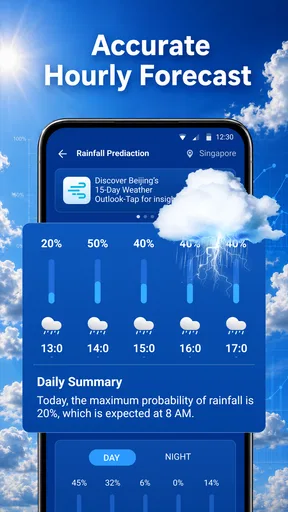
- Clear hourly and daily forecasts for quick planning
- Radar maps help track rain and approaching weather systems
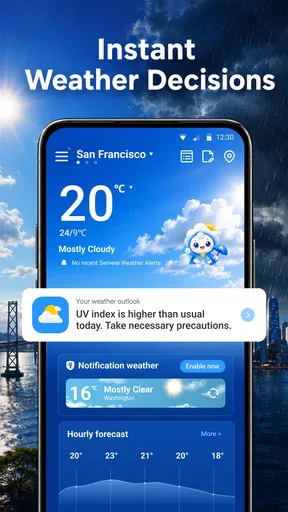
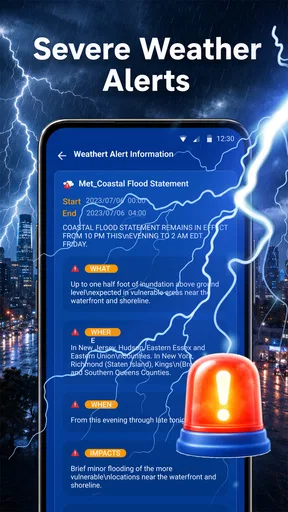
- Useful weather alerts can improve preparation for severe conditions
- Clean interface makes key information easy to find
- Supports weather checks for multiple saved locations
Limitations of WeatherGuide: Forecast & Radar
- Some advanced features may require a premium subscription
- Forecast accuracy can vary by location and changing conditions
- Radar data may load slowly on weaker internet connections
- Frequent notifications could feel excessive for some users
- Battery and data use may increase with location updates
Similar Picks in This Category
View All
Weather - By Xiaomi
Xiaomi Inc.4.1

Weather & Radar Forecast
WetterOnline4.8

Weather
OneLouder Apps4.6

AccuWeather: Weather Radar
AccuWeather3.6

The Weather Channel - Radar
The Weather Channel4.6

1Weather Forecasts & Radar
OneLouder Apps4.3
Frequently Asked Questions
What is WeatherGuide: Forecast & Radar, and what does it offer?
WeatherGuide: Forecast & Radar is designed to provide quick access to current conditions, short-term forecasts, extended outlooks, temperature details, precipitation information, wind data, and radar-based weather views. Its main purpose is to help users plan commutes, outdoor activities, and travel by presenting several important weather indicators in one convenient mobile app.
How accurate are the forecasts and radar predictions in WeatherGuide?
Forecast accuracy depends on the quality of the weather data sources, your location, and how far ahead you are checking. Like other weather apps, WeatherGuide is generally most reliable for current conditions and the next few hours, while longer-range predictions can change. Radar information is useful for tracking nearby rain or storms, but it should not replace official emergency warnings.
Does WeatherGuide: Forecast & Radar require location access?
The app may request location permission so it can automatically display weather conditions and forecasts for your current area. You can usually choose whether to allow precise or approximate location access, depending on your device settings. If you prefer not to share your location, you may be able to search for and save cities manually, although some convenience features may be limited.
Is WeatherGuide: Forecast & Radar free to download and use?
WeatherGuide may be available as a free download, but users should check the current listing in the Google Play Store or Apple App Store for details about advertisements, optional subscriptions, or premium features. Some functions, such as an ad-free experience, advanced forecast information, extra radar layers, or additional saved locations, may require an in-app purchase depending on the version.
Can I rely on WeatherGuide during severe weather or emergencies?
WeatherGuide can be helpful for monitoring changing conditions, precipitation, wind, and storm activity, but it should not be your only source during dangerous weather. For hurricanes, tornadoes, floods, wildfires, or severe thunderstorms, always follow alerts from local authorities and official meteorological services. Enable system notifications where available and keep emergency information accessible even if internet service becomes unreliable.
